
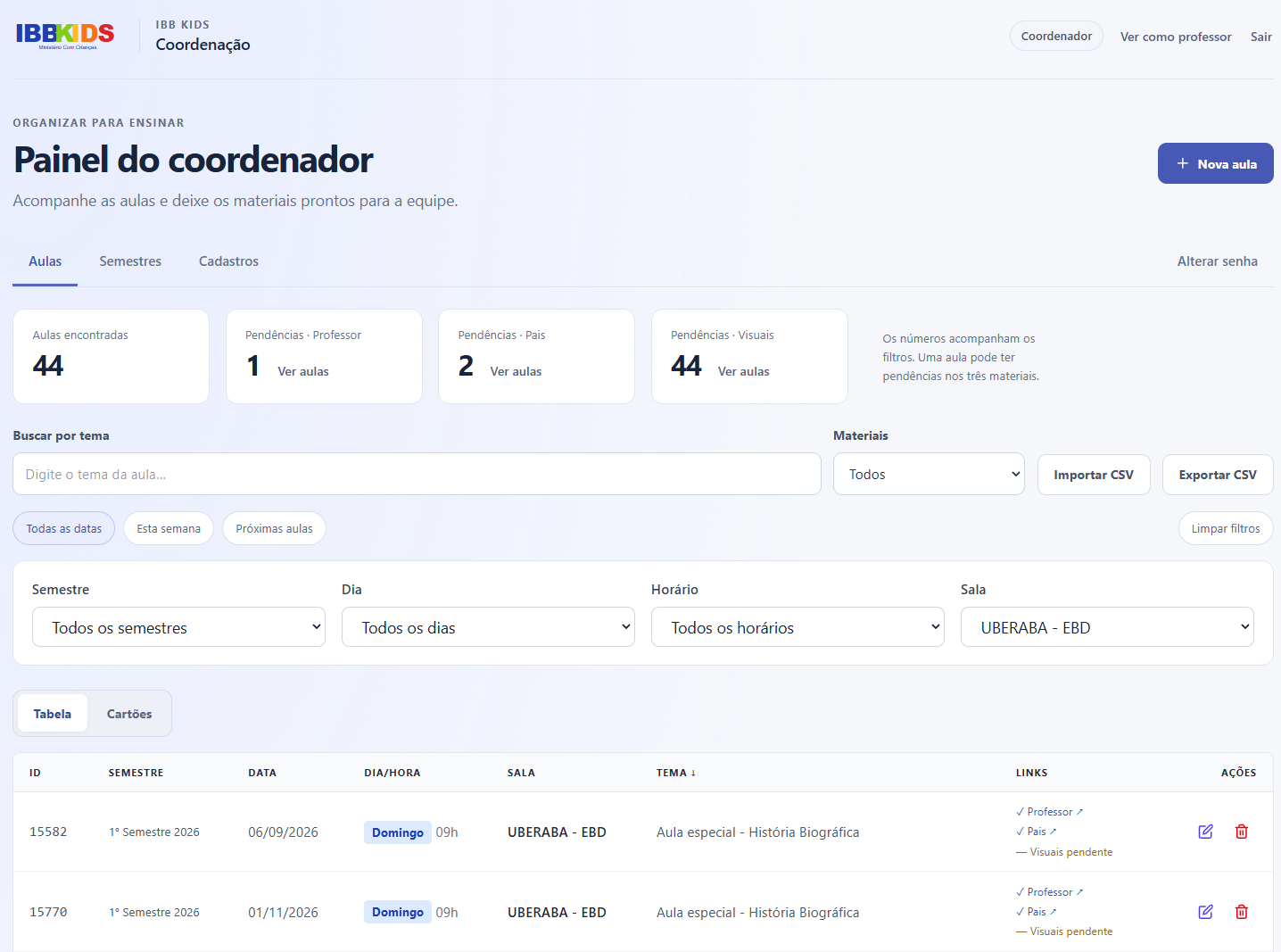
I originally built IBB Kids as a volunteer project to streamline weekly classroom material management for a non-profit community. Teachers needed instant access to semester schedules, locations, and lesson links without digging through shared spreadsheets.
While the functional requirement was straightforward, the operational constraint was non-negotiable: the system had to run at zero cost on an ARM-based cloud instance with near-zero maintenance overhead, while remaining reliable enough to be operated by non-technical volunteers.
Ten months after its initial launch, the core challenge shifted from feature development to production engineering: managing JWT session revocation, building native C++ modules for the target architecture, controlling releases, and verifying consistent database backups.
This post documents the architectural decisions, resilience patterns, and operational lessons learned while running a single-node SQLite workload in production up to October 2026.
Architectural Steering & AI-Augmented Engineering
To maintain high delivery velocity while keeping my primary focus on system reliability, state consistency, and platform security, I adopted an AI-augmented software engineering workflow:
Architectural Steering & Systems Design (Human): I designed the system topology, multi-environment isolation model, database state transition rules, JWT session versioning schemes, SQLite WAL backup strategies, native C++ binding validation scripts, and CI/CD rollback procedures.
Code Implementation (Codex): I leveraged OpenAI Codex as an execution engine to translate my technical specifications, API schemas, and architectural constraints into full-stack TypeScript (
React+Express+SQLite) code.Validation & Production Hardening (Human): I established the operational quality gates—including unit/integration testing with isolated in-memory SQLite instances, static security analysis via Semgrep SAST, build-id health checks, and native binding checks for ARM64 Linux runtimes.
This division of responsibilities allowed me to act as a Tech Lead / Systems Architect, focusing strictly on system resilience and operability without spending hundreds of hours writing boilerplate application code.
System Architecture: Single-Node Edge Topology
The application relies on a lightweight, decoupled stack designed to maximize performance on low-spec hardware while enforcing strict domain boundary separation:
Frontend: React with TypeScript, bundled by Vite, styled via Tailwind CSS v4.
Backend: Express API server hosting static production assets.
Database: SQLite running locally via
better-sqlite3.Process Management: PM2 enforcing daemon isolation.
Edge Proxy: Nginx managing HTTPS termination via Certbot/Let’s Encrypt certificates on Oracle Linux ARM.
| |
In development, Vite proxies /api calls to Express. In production, Vite is not running; Express directly serves optimized static assets alongside the API endpoints.
Native C++ Bindings Across Environments
Developing on Windows via WSL2 (x86_64) and deploying to Oracle Linux ARM (ARM64) introduced native-module compatibility problems—specifically when loading native C++ modules like better-sqlite3 and bcrypt.
A common failure mode in multi-platform deployments is the dreaded invalid ELF header error, caused by attempting to execute C++ binaries compiled for x86_64 inside an ARM64 Linux runtime (or sharing node_modules across WSL2 and host Windows filesystems).
Rules for Native Module Isolation
Strict Environment Boundary: Never share or mount
node_modulesbetween Windows, WSL2, or remote Linux servers.Version Pinning: Enforce Node.js runtime alignment using
.nvmrc(pinned to Node 22 LTS) and commit explicit lockfiles (package-lock.json).Pre-flight Native Compilation Check: Introduced a dedicated
npm run prepare-nativelifecycle script during the build step:
| |
Rebuilding on the ARM server is native compilation for that server. Cross-compilation would mean building for ARM on a different target architecture with a suitable toolchain.
The prepare-native script attempts to initialize an in-memory SQLite instance and test bcrypt hash routines. If native bindings fail to load due to an architecture mismatch, the script automatically invokes node-gyp to recompile C++ bindings against local system tools (using GCC Toolset and Python 3.12) before validating the result.
SQLite in Production: WAL Mode, Backup Integrity, and OCI Sync
With WAL enabled, committed changes may still be in the WAL rather than the main database file. Copying only a live .sqlite file can miss those changes or capture an inconsistent copy. A backup must preserve a consistent committed state across SQLite’s storage files.
| |
1. Online Backup API Execution
Backups use the SQLite Online Backup API, exposed via better-sqlite3, to create a consistent database copy. It reads through SQLite, including committed data held in the WAL. It does not commit pending transactions or require a manual flush of uncommitted frames. Incremental backup steps acquire the locks needed for those steps. See the SQLite backup documentation.
2. Automated Integrity Validation
Before any backup is marked valid, the pipeline executes rigorous structural checks:
| |
If either query returns errors, the snapshot is instantly discarded, and an alert is raised.
3. Keyless Cloud Replication via OCI Instance Principals
Once validated locally, daily backup archives are streamed directly to a private Oracle Cloud Infrastructure (OCI) Object Storage bucket.
To prevent security credential leaks, the VM relies on OCI Instance Principals (IAM dynamic group policies attached to the VM instance). No static private keys, AWS-style secret pairs, or cloud tokens exist in .env files or application code.
4. Controlled Restore and Session Invalidation
Restoring a backup automatically triggers:
File validation and integrity checks on the candidate snapshot.
A compulsory safety backup of the current live database.
Entering a maintenance window, stopping the application and other database writers, and closing their database connections.
Replacing the database using the restore procedure, handling WAL/SHM files as part of that offline replacement, and invalidating sessions.
Application restart and automated
/healthcheck validation.
Process Management and Controlled Releases
Relying on git pull and in-place npm restart on a production server creates a window of downtime and risks leaving the application broken if native compilation or build steps fail halfway through.
Why I Chose PM2 Fork Mode
I chose one application process to simplify this deployment. That was an operational choice, not a SQLite requirement:
- Write Contention: SQLite supports multiple processes on the same host, with one writer at a time. Keeping one application process simplified transaction management for this workload. Multiple workers can be valid, but need short transactions, busy handling and workload testing. Contention alone is not evidence of database corruption. See SQLite WAL concurrency.
- Runtime and Loader Configuration: Using
tsxand PM2 together requires a tested interpreter and loader configuration. Fork mode reduced the number of moving parts in this setup; loader failures should not be generalized to every cluster-mode deployment. - Explicit Runtime Selection: Recording the Node version and checking the interpreter used by PM2 makes runtime upgrades easier to diagnose. The daemon and application configuration still need to be checked together.
Versioned Release Directories
Deployments use versioned release directories to prepare a candidate without overwriting the currently deployed files:
| |
Deployment Lifecycle Execution
Checkout SHA: The CI/CD runner fetches the exact commit SHA into a new folder under
/releases/<timestamp>.Build & Prepare: Dependencies are installed (
npm ci), C++ native bindings are compiled (npm run prepare-native), unit tests run against an isolated SQLite instance, and Vite builds static assets.Controlled Process Replacement: The single application process is restarted against the candidate release using the configured Node runtime. This creates an interruption; its duration needs measurement.
Healthcheck Probe Verification: The deployment script polls the
/healthendpoint. The endpoint returns a unique JSON payload containing the release commit SHA:
| |
Release Acceptance: Accept the candidate only if its health response contains the expected
deployId. An atomic update ofcurrentselects a release directory, but does not by itself replace a running process or change Nginx’s HTTP upstream.Rollback: If validation fails, return to the previous code release and restart it. This only works if the database schema remains compatible. A code rollback does not undo migrations or writes made by the candidate.
A zero-interruption design would additionally require separate candidate and active endpoints, a health-gated proxy switch, connection draining and compatible database changes. None of those properties follows from a symlink switch alone. PM2 documents zero-downtime reload for cluster-mode applications; this single-process procedure should be evaluated as a controlled restart.
Stateful Security & Deterministic Session Invalidation
JWTs are inherently stateless, which presents a security challenge: if an administrative credential is changed, previously issued JWTs remain valid until their natural expiration.
Session Versioning via auth_state
To solve this without adding a heavy Redis layer, I implemented a database-backed session versioning scheme:
| |
Every issued JWT payload includes the current
sessionVersionfor that profile.Incoming requests verify the JWT signature, allowed algorithm, expiry and configured issuer/audience before checking
sessionVersionagainstauth_state. Decoding alone is not authentication.When a user updates their password, a SQLite transaction updates the
bcryptpassword hash and incrementssession_version:
| |
Tokens carrying the previous version are rejected on their next validation. Every protected request must perform that check; caches and long-lived connections require their own invalidation policy.
A database restore can roll the version counter back and accidentally make an old token valid again. A restore procedure must also rotate the signing key or replace a session epoch held outside the restored database. Incrementing a restored counter alone is insufficient.
CI/CD Security Analysis (Semgrep SAST)
The GitHub Actions pipeline includes a dedicated security job running Semgrep Community Edition (Python 3.12):
Scans pull requests and pushes to
dev/developbranches.Enforces rules for hardcoded secrets, SQL injection vectors, and unsafe path interpolations.
Exports results as SARIF artifacts for historical audit without relying on paid third-party security dashboards.
Operational Evolution After 10 Months (October 2026 Review)
Returning to the system after 10 months of real-world use provided concrete feedback from the volunteers operating the application:
| Operational Dimension | Initial Design (Dec 2025) | Hardened Architecture (Oct 2026) |
|---|---|---|
| Material Management | Teacher and Parent material links | Added Visual Aids tracking across database, APIs, and UI layers |
| Data Granularity | Single count of incomplete lessons | Split tracking for missing Teacher, Parent, and Visual materials |
| Runtime & PM2 Isolation | Hybrid Node 20 / Node 22 PM2 daemons | Unified across environments on Node 22 LTS (ARM64) using PM2 fork mode |
| Database Purging | Manual SQL execution | Password verification, explicit confirmation and a consistent safety backup before destructive changes |
| Backup Redundancy | Local disk snapshots only | Local integrity-verified snapshots + OCI Object Storage sync via IAM Instance Principals |
| Test & Security Coverage | Basic build checks | Unit tests and Semgrep checks; counts vary with the revision and should be read from the matching CI run |
Key Takeaways for SREs and Platform Engineers
Recovery and Availability Are Different: Backups and versioned releases improve recovery, but one host remains a single failure domain. Host maintenance or failure can take the application offline. Record recovery tests and measured downtime before claiming an availability target.
Treat AI as a Force Multiplier, Not a Black Box: Delegating code generation to tools like Codex works best when the engineer owns the system architecture, boundary constraints, test design, and failure modes.
Choose Process Management Deliberately: One process simplified this workload. SQLite can also serve multiple local processes; concurrency settings, transaction length and observed contention should guide that choice.
Test Restores, Not Just Backup Creation: Create a consistent backup through SQLite, check its integrity, and periodically restore it into an isolated environment. Integrity checks alone do not demonstrate that the application can recover within the required time.
Revision note
October 2026: corrected the explanations of WAL backups, concurrency and native compilation. This article describes a single-host operational design, not a demonstrated zero-downtime or highly available deployment. Availability, restore duration and CI counts need evidence from the corresponding release.
Comments are disabled until you accept functional cookies.